Milada: A Handwritten Font for Web Design
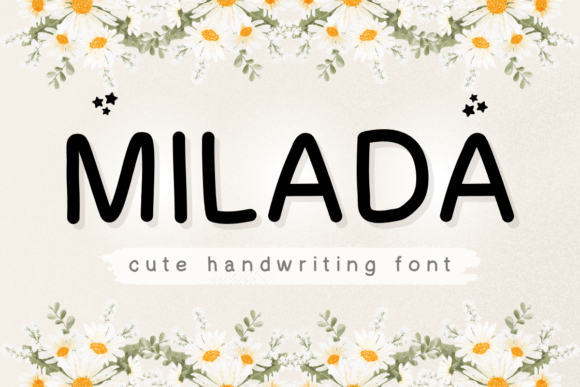
Milada is a simple and cute handwritten font that adds a personal touch to digital projects. As a web designer, I appreciate fonts that bring warmth and character without compromising clarity. Milada fits this need perfectly, offering a soft, approachable style ideal for modern web design.
With its clean strokes and gentle curves, Milada brings a sense of authenticity to any layout. It’s not overly ornate, which makes it versatile for both bold headlines and subtle accents. This balance ensures it works well in various digital contexts, from landing pages to social media graphics.
Using Milada in Web Design
Milada excels as a display font, making it a great choice for headers, call-to-action buttons, and hero sections. Its readability on screen means it can be used effectively even at smaller sizes, provided the design allows for proper spacing and contrast.
For a creative portfolio site, Milada can serve as the primary heading font, adding a unique personality to the design. Pairing it with a clean sans serif like Roboto or Lato creates a strong visual contrast while maintaining legibility. This combination helps guide users through the content without overwhelming them.
In an online boutique, Milada can highlight product titles or promotional banners. Its friendly appearance aligns well with brands targeting a youthful or artisanal audience. When used on dark backgrounds, the font remains clear, but ensure sufficient padding around text to avoid visual clutter.
Brand Tone and Visual Hierarchy
The personality of Milada contributes to a brand’s tone. It conveys creativity, approachability, and a touch of playfulness—ideal for startups, lifestyle brands, or educational platforms. When designing a coaching website, for example, using Milada in section headings can reinforce a warm, supportive message.
Its natural flow also supports visual hierarchy. By using Milada for key headings and reserving more structured fonts for body text, designers can create a layout that guides the eye smoothly from one element to the next. This helps improve user engagement and overall readability.
On mobile screens, Milada maintains its charm but requires careful attention to line height and letter spacing. Small buttons with Milada text should have enough padding to prevent accidental taps, especially when placed over images or busy backgrounds.
Practical Applications for Digital Creators
For a course sales page, Milada can be used in headline copy to draw attention to key benefits. It pairs well with a serif font for subheadings, creating a layered look that feels professional yet inviting. This approach is effective for SaaS founders or bloggers looking to build trust through design.
In blog graphics, Milada adds a personal touch to title cards or featured posts. It’s also useful for social media content, where a handwritten feel can make posts stand out in crowded feeds. When used in short phrases, such as “Join Our Community” or “Start Today,” it enhances the emotional appeal of the message.
For a digital brand kit, Milada can appear in logo designs, email signatures, or app icons. Its simplicity ensures it scales well across different formats, from desktop to mobile. When paired with a modern sans serif, it creates a cohesive look that feels both stylish and functional.
Font Pairing and Design Assets
When pairing Milada with other fonts, consider the contrast between styles. A decorative script like Milada works best alongside a neutral typeface. For editorial designs, pairing it with a serif font like Georgia or Playfair Display can evoke a classic, refined aesthetic.
Check the available styles and file formats before integrating Milada into a project. Ensure it includes webfont options for easy implementation. If the font offers alternates or ligatures, use them to add subtle variation and keep the design from feeling repetitive.
Support for multiple languages is important for global audiences. Milada’s character set should cover common scripts, allowing it to be used across different regions without sacrificing quality.
Commercial Licensing and Usage
When using Milada for client projects, online stores, or digital templates, confirm the commercial license terms. Some fonts require separate licenses for web use or redistribution, so always review the agreement carefully.
For a brand asset, ensure that the font is properly licensed for all intended uses. This includes websites, marketing materials, and app interfaces. Proper licensing protects both the designer and the end user from potential legal issues.
Milada’s versatility makes it a valuable addition to any digital toolkit. Whether you're working on a landing page, an e-commerce site, or a creative portfolio, its friendly yet professional look can enhance the overall user experience. With thoughtful application, it can help build a stronger brand identity and drive better engagement across digital platforms.